
A smart home used to mean an expensive, complicated project reserved for tech enthusiasts. Not anymore. Today you can automate the most useful parts of your home one affordable device at a time, and the payoff is real: lower energy bills, better security, and the small daily conveniences that quietly make life easier. The challenge isn’t access — it’s knowing where to start so you don’t waste money on gadgets you’ll abandon.
Also Read



This starter guide walks through how to build a smart home that actually works: which devices deliver the most value, how to choose an ecosystem, and the order most homes should automate. The goal is a home that’s genuinely more convenient, not a drawer full of disconnected gadgets.
Start With an Ecosystem Decision
Before buying a single device, pick the platform that will tie everything together. The major voice assistants and smart-home hubs each let you control devices from one app and trigger routines, but mixing incompatible systems leads to frustration. Choose one as your backbone — ideally the one that works with the phone and speakers you already own — and prioritize devices that support it.
That said, don’t let the ecosystem trap you into a worse product. Many devices now support multiple platforms, and the newest interoperability standards make cross-brand compatibility far easier than it once was. Pick a backbone, but check compatibility on each purchase rather than buying blind.

The Devices Worth Starting With
1. A Smart Speaker or Display
This is the natural hub and the easiest entry point. A smart speaker lets you control other devices by voice, set timers and reminders, check the weather, and play music. A version with a screen adds video calls, recipes, and a visual dashboard. It’s inexpensive, immediately useful on its own, and becomes the command center as you add more.
2. Smart Lighting
Smart bulbs and plugs are the highest-impact starter upgrade. Schedule lights to mimic sunrise, turn off automatically when you leave, or dim for the evening with a word. Smart plugs extend the same control to lamps, fans, and ordinary appliances, making “dumb” devices schedulable for a few dollars each. The convenience is felt every single day.
3. A Smart Thermostat
This is where automation pays you back. A smart thermostat learns your routine and adjusts heating and cooling to avoid wasting energy when you’re out or asleep, often trimming a noticeable amount off energy bills. It’s one of the few smart devices that can genuinely fund the rest of your setup over time.
4. Smart Security Basics
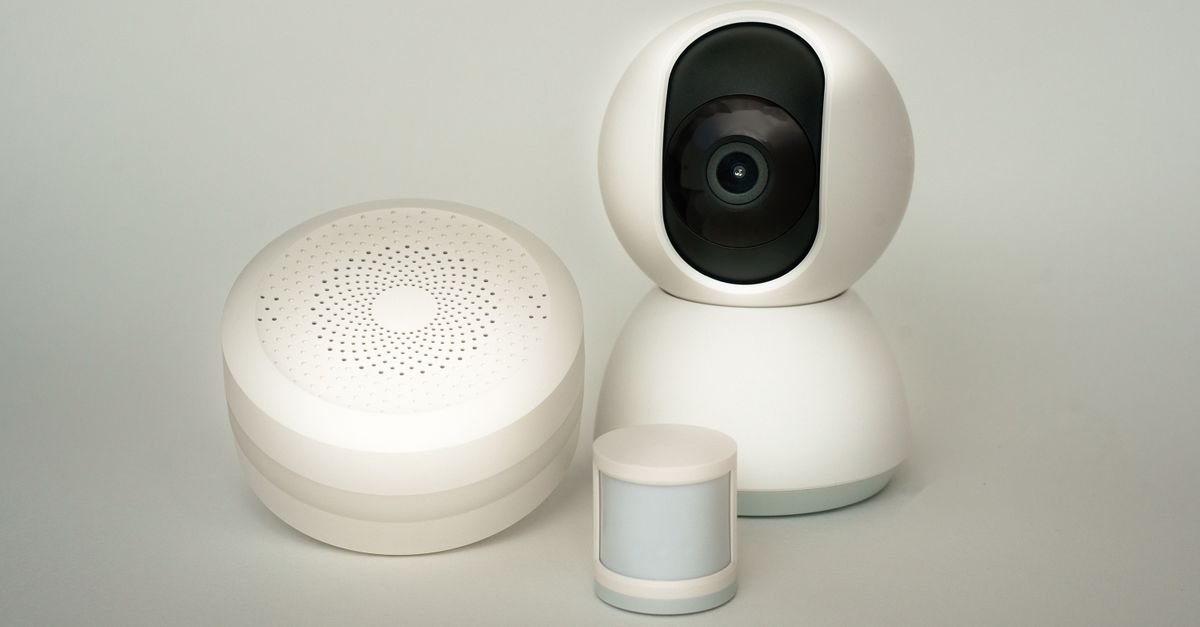
A video doorbell and a couple of smart cameras add real peace of mind. Seeing who’s at the door from your phone, getting motion alerts, and checking in while away are practical benefits, not gimmicks. Pair them with smart locks for keyless entry and the ability to let someone in remotely. Security is often where people feel the value of a smart home most.
Build Routines, Not Just Gadgets
The magic of a smart home isn’t individual devices — it’s getting them to work together. Routines (also called automations or scenes) trigger multiple actions at once. A “good night” routine can lock the doors, turn off the lights, and lower the thermostat with a single command. A “leaving home” routine can shut everything down automatically when your phone leaves the area. This is the point where a collection of gadgets becomes an actual smart home.
Start Simple
Don’t try to automate everything at once. Begin with one or two routines you’ll use daily — a morning wake-up or an evening wind-down — and expand as you get comfortable. Over-automating early is the fastest way to get frustrated and give up.
Keep It Secure and Reliable
A connected home is only as trustworthy as its security. Use strong, unique passwords for your accounts and enable two-factor authentication wherever it’s offered. Keep device firmware updated, and consider putting smart devices on a separate network from your computers and phones if your router allows it. Choose reputable brands that release regular security updates rather than the cheapest unknown option. A little caution protects both your privacy and your home.
Plan for Growth
The best smart homes grow gradually. Start with a hub and lighting, add climate and security, then layer in conveniences like smart blinds, sensors, or automated appliances as you find genuine uses for them. Buying in stages lets you learn what fits your life and avoid the graveyard of gadgets that looked clever but solved no real problem.

Pick the Ecosystem Before the First Device
The decision that governs every later purchase: which assistant runs the house — Amazon Alexa (broadest budget-device catalog), Google Home (strongest if the household lives in Android and Google services), or Apple Home (tightest privacy posture, happiest with iPhones). The choice filters every product page after it, because a bargain device that doesn’t speak the house’s language is a drawer ornament. The industry’s mercy: the Matter standard keeps absorbing device categories, making new gear increasingly ecosystem-agnostic — so when prices tie, the Matter logo is the tiebreaker that future-proofs. Two infrastructure notes before any shopping: the router matters more than any gadget (most “smart home problems” are Wi-Fi problems — a mesh node per floor ends them), and every device joins the same 2.4GHz network with credentials written somewhere findable, because setup day always asks.
The Build Order (Automate in This Sequence)
Stage one — lighting: smart bulbs in the lamps you touch daily plus one or two smart switches for built-ins; scenes (“evening,” “movie,” “goodnight”) deliver the daily-magic feeling that funds enthusiasm for everything else. Stage two — plugs and schedules: smart plugs turn dumb lamps, fans, and the coffee maker into scheduled citizens for pocket change. Stage three — comfort: the smart thermostat, the category with actual payback math (see the energy section), installed where renters check lease terms first. Stage four — the guardians: leak sensors under sinks and the water heater, smoke/CO listeners, and door sensors — cheap devices whose one save pays the whole system. Stage five — cameras and locks, deliberately last: the highest-stakes privacy and security decisions deserve a settled household, not launch-day enthusiasm (the security pillar owns the deep dive). Resist the everything-at-once box set — staged builds produce households that USE their automations; hauls produce app graveyards.
Automations That Actually Get Used (Steal These)
The gap between owning smart devices and living in a smart home is a handful of routines: “Goodnight” — one phrase kills every light, locks the lockable, drops the thermostat, and arms what should be armed. “Leaving” — geofenced or spoken: lights off, thermostat eco, robot vacuum released. Morning ramp — bedroom and kitchen lights warming up on a schedule that beats alarm clocks at their own job. The arrival scene — porch and hallway lights greeting the geofence after dark. The laundry/dishwasher nudge — a plug’s power-draw sensing pinging phones when the cycle ends (the humble automation with the highest daily gratitude score). Motion-light the transit zones — hallway, pantry, garage: hands-full spaces where switches were always in the wrong place. Build these six and the house feels intelligent; skip them and it’s just bulbs with apps.
Privacy and Security Housekeeping (The Adult Portion)
A smart home is a small fleet of networked computers, and it deserves fleet hygiene: unique passwords and two-factor on the ecosystem account (the master key to the whole house); a guest or IoT network where the router offers one, keeping gadget traffic off the laptop lane; quarterly firmware sweeps — updates patch real vulnerabilities, and the fifteen-minute ritual (update, reboot router, confirm devices answer) doubles as the reliability fix for half of all glitches; camera and microphone placement ethics — no cameras in private rooms, hardware mute switches respected, voice-history purges scheduled; and the departure plan — factory-reset instructions saved for every device, because smart homes move, sell, and get inherited by confused buyers. None of this is paranoia; it’s the same lock-your-door energy the analog house always ran, updated for gear that talks.
Renters, Budgets, and the No-Drill Smart Home
Nearly the entire starter stack is landlord-proof: bulbs, plugs, speakers, sensors mounted on adhesive, battery video doorbells over existing peepholes, and thermostat swaps where leases allow (photograph the old unit, reinstall at move-out). The renter’s build order matches the owner’s with one inversion: portability weighs every purchase — prefer devices that reset cleanly and travel (bulbs, plugs, speakers) over installed gear. Budget tiers for either tenure: $100 — two bulbs, two plugs, one speaker: the proof-of-concept house; $300 — the lighting scenes, the guardian sensors, the laundry nudge; $700+ — thermostat, doorbell, a lock where owned, and the mesh upgrade the whole fleet rides on. The renter-friendly doctrine applies verbatim: invest in what leaves with you.
The Energy Math (Where Smart Actually Pays)
The genuine payback lives in three places: the smart thermostat — schedule-and-geofence heating/cooling routinely trims meaningful percentages off the largest line on the utility bill, the one smart purchase with utility-rebate programs behind it (check yours before buying — many effectively discount the device to pocket change); standby-power sweeps — smart plugs killing always-warm electronics (entertainment stacks, chargers, the heated coffee plate) reclaim real dollars per year per outlet; and off-peak scheduling — where time-of-use rates exist, dishwashers and laundry shifted to cheap hours by plug or appliance schedule turn rate tables into savings without behavior change. The honest wash: smart bulbs save little over LED dumb bulbs (LED did the saving; smart adds control), and no gadget out-saves insulation — the efficiency pillar ranks the whole hierarchy. Buy the thermostat for math, the rest for life quality, and let an energy monitor referee any claim a product page makes.
Troubleshooting: The Ladder That Fixes 90%
When a device goes dumb, climb in order: 1. Power-cycle the device (ten seconds unplugged); 2. Reboot the router — the true culprit in half of everything; 3. Check for firmware updates in the app; 4. Confirm the 2.4GHz band — new routers silently shuffle old devices to 5GHz bands they can’t hold; 5. Remove and re-add the device; 6. Factory reset (photograph settings first); 7. Check the manufacturer’s status page — cloud outages impersonate broken hardware weekly. Chronic droppers live at Wi-Fi’s range edge: a mesh node ends months of mystery for the price of one gadget. Tape the ladder inside a cabinet door — the household’s calmest member is tech support by default, and the list converts an evening of frustration into five minutes of procedure.
A Day in the Working Smart Home
What the build order buys, hour by hour: 6:45 — bedroom lights ramp warm before the alarm; the kitchen’s coffee plug fired at 6:30. 8:10 — “leaving” collapses the house: lights off, thermostat eco, vacuum released, door sensor armed. 12:00 — the leak sensor under the dishwasher does absolutely nothing, which is its job 364 days a year. 17:40 — the geofence warms the living room and lights the porch before the car turns in. 19:30 — “movie” dims the room to ten percent; the doorbell pings a delivery without anyone standing up. 22:30 — “goodnight” sweeps every light, locks the door, drops the heat, and arms the sensors in one phrase. None of it is dramatic — and that’s the entire measure of a smart home that works: forty small frictions a week, quietly deleted.
Beyond the Basics: Sensors, Blinds, and the Second Wave
Once the starter stack settles, the second wave adds the clever layer: motion and contact sensors become automation triggers (pantry lights, a mailbox-opened ping, hallway night-paths at 10% brightness); temperature and humidity sensors drive the bathroom fan (the humidity war’s automated soldier) and flag the greenhouse-hot nursery; smart blinds and curtain motors — the luxury tier that earns its price on tall windows and sun-baked rooms, opening with the sunrise ramp; robot vacuums graduate from gadget to staff with scheduled zones and no-go lines; and the dashboard tablet — an old tablet wall-mounted as the house’s control panel retires the where’s-my-phone problem for guests and kids. The second wave’s discipline is the same as the first’s: every addition must delete a friction, or it’s just inventory with firmware.
Smart Home Gifting and the Household Rollout
Two human problems the manuals skip: gifting — smart devices make risky presents when they assume an ecosystem; the safe list is ecosystem-agnostic (smart plugs, Matter bulbs, leak sensors, an energy monitor), and the risky list (hubs, cameras, locks) belongs to household decisions, not surprises. The rollout — a smart home fails socially before it fails technically: every automation needs a manual override that works like the old switch (the least-technical member is the design constraint, not an afterthought), scenes get named in human words (“goodnight,” not “routine_7b”), the household walkthrough happens the day anything new arrives, and guests get one card on the fridge: how to turn on lights, play music, and answer the doorbell. Adoption is the metric that matters — a house where only one person can work the lights isn’t smart; it’s hostage.
The Starter-Guide Master Checklist
Before buying: pick the ecosystem, strengthen the Wi-Fi (mesh node per floor), write down the network credentials, list the week’s three worst frictions. Build order: lighting scenes → plugs and schedules → thermostat → guardian sensors → cameras/locks last. The six automations: goodnight, leaving, morning ramp, arrival, laundry nudge, motion-lit transit zones. Hygiene: two-factor on the master account, quarterly firmware-and-reboot ritual, guest network where offered, factory-reset notes saved. Judgment: Matter logo on ties, energy claims refereed by a monitor, every purchase deleting a friction. Renters: everything above minus the drill — bulbs, plugs, sensors, and battery doorbells all leave with you. Print it, build a stage a month, and the house is quietly intelligent by spring.
What NOT to Buy First (The Starter-Kit Traps)
The category’s money leaks, labeled: the all-in-one mega-kit — twelve devices, one weekend, three still working by spring; staged builds beat hauls because habits form one automation at a time; smart appliances bought FOR smartness — fridges and washers gain intelligence on replacement day, never before (the kitchen pillar’s rule, house-wide); cameras before conversations — indoor cameras purchased pre-consensus become the family’s first privacy argument; proprietary-hub gadgets from brands without Matter plans — orphaned ecosystems are the category’s landfill genre; and anything solving a problem you don’t have — the friction list from the checklist exists precisely to veto aisle enthusiasm. The reliable pattern: buy the boring winners early (plugs, bulbs, sensors), the glamorous ones late, and the trendy ones never — the smart home is a marathon of small deletions, not a showcase.
When Things Get Weird (The Edge-Case Drawer)
Three situations every smart household eventually meets: the internet outage — well-built systems degrade gracefully (switches still switch, locks still key, thermostats hold schedule); if any device becomes a brick offline, it failed the manual-override rule at purchase; the ecosystem migration — switching assistants mid-life is a weekend of re-pairing, survivable if devices were Matter-leaning and miserable if hub-locked (one more argument for the logo); and the handover — moving, selling, or inheriting a smart house needs the documentation nobody wrote: device list, account transfers, factory-reset steps, and the Wi-Fi card. Twenty minutes in a notes app labeled “house brain” converts every future edge case from crisis to checklist — the smartest device in the home remains the one that wrote things down.
The First Weekend, Scripted
Saturday morning: pick the ecosystem over coffee, order the $100 starter (two bulbs, two plugs, one speaker, one leak sensor), and write the Wi-Fi card. Saturday evening: bulbs into the two most-used lamps, the “goodnight” scene built and tested to laughter. Sunday: plugs onto the coffee maker and the lamp the switch never reached, the sensor under the kitchen sink, and the morning ramp scheduled for Monday’s alarm. One weekend, five devices, three deleted frictions — and the household hooked on the boring magic that the whole guide was ever selling.
And the measure of success, one year in: nobody in the house talks about the smart home anymore — the lights simply behave, the door simply locks, and the one time the leak sensor shrieked, it paid for the entire system twice over. Invisible, boring, and quietly indispensable: the only three adjectives this category should ever aspire to, and the ones this guide was built to deliver.
Frequently Asked Questions
What’s the first smart home device I should buy?
A smart speaker or display is the easiest start — it’s useful on its own and becomes the hub for everything else. Smart lighting is the best next step for everyday convenience.
Do I need a hub for a smart home?
Not always. Many devices connect over Wi-Fi directly, but a central hub or smart speaker makes controlling everything and building routines much simpler, especially as you add more devices.
Can a smart home save money?
Yes. A smart thermostat and scheduled lighting reduce energy waste, often trimming a meaningful amount off your bills over time and helping offset the cost of other devices.
Are smart home devices secure?
They can be, with care. Use strong unique passwords, enable two-factor authentication, keep firmware updated, and stick to reputable brands that provide regular security updates.
Key Takeaways
- Pick one ecosystem as your backbone, but check device compatibility before each purchase.
- Start with a smart speaker and smart lighting — the easiest, most useful first upgrades.
- Add a smart thermostat for energy savings and basic security devices for peace of mind.
- Build simple daily routines so devices work together — that’s what makes a home truly smart.
- Secure your setup with strong passwords and updates, and grow your system in stages.
A smart home doesn’t have to be complicated or expensive. Choose an ecosystem, start with a few high-value devices, connect them with simple routines, and expand as you go. For more guidance, explore our home technology guides and the full Smart Home & Tech collection.
More Smart Home & Tech Guides & Reviews
- Best Smart Home Devices to Save Energy & Money
- Importance in Modern Living: Embrace Essential Trends!
- Best Deals on Smart Thermostats
- Voice-Controlled Home Devices Under $100: Best Affordable Smart Gadgets
- Smart Door Locks
- Wireless Charging Stations: Device and Power Compatibility
- Best Air Purifiers 2026: Top Picks for Clean, Fresh Air
- Best Tower Fans 2026: Top Picks for Cool, Quiet Rooms
- Laptops for Video Calls: What to Compare
- Best Smart Home Devices to Buy in 2026

I'm Nasir Uddin Khan, founder of HomeNeeds24 and a senior IT consultant with 18+ years' experience in Oracle database administration, enterprise infrastructure and ERP system design. I write the buying guides here and I build every calculator on the site myself, from published engineering standards rather than opinion. My research is structured rather than lab-based: manufacturer specifications, safety and efficiency standards, and the trade-offs that repeat across large volumes of verified customer reviews. Where I have direct hands-on experience — smart home, networking, energy and anything computer-adjacent — I say so in the guide.