
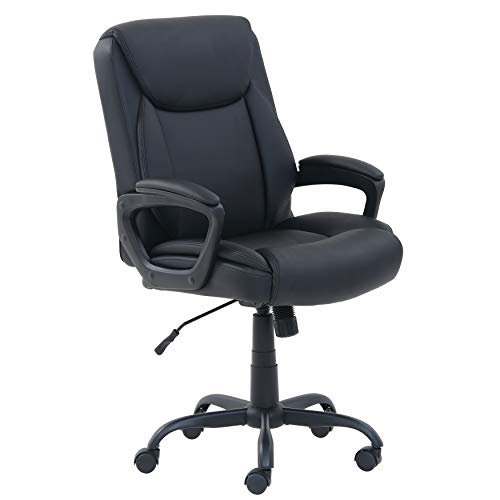
If you spend hours at your desk — gaming, working, or both — your chair matters more than almost any other piece of gear. The wrong chair causes back pain, poor posture, and fatigue that ends sessions early; the right one supports you comfortably for the long haul. An ergonomic gaming chair is built for exactly that. This guide covers what makes a gaming chair genuinely ergonomic, what to look for, and how to choose the right one.
Also Read


Why Your Chair Is the Most Important Upgrade
It’s tempting to spend on the monitor, the PC, or the peripherals — but you sit in your chair for every single hour you play or work. A poor chair leads to slouching, lower-back strain, neck and shoulder tension, and discomfort that genuinely affects your focus and health over time. Investing in proper support is the single best thing you can do for comfort and long-term wellbeing at your desk. Ergonomics isn’t a luxury here; it’s the foundation.

What Makes a Chair Truly Ergonomic
“Gaming chair” is a marketing term — the racing-style look doesn’t guarantee good ergonomics. What actually matters is adjustability and support:
- Lumbar support: proper lower-back support (adjustable or well-designed) is the most important feature for preventing back pain.
- Adjustable armrests: ideally 3D or 4D (height, width, depth, angle) so your shoulders and wrists stay relaxed.
- Seat height adjustment: so your feet rest flat and knees sit at roughly a right angle.
- Recline & tilt: the ability to lean back and change posture through the day reduces strain.
- Adjustable headrest: supports the neck during reclining or relaxed sessions.
- Seat depth & comfort: enough depth to support your thighs without pressure behind the knees, with quality, supportive padding.
The more genuinely adjustable a chair is, the better you can tailor it to your body — and that fit is what makes it ergonomic.
Gaming Chair vs. Ergonomic Office Chair
Worth knowing: racing-style gaming chairs and traditional ergonomic office chairs both have fans. Gaming chairs offer a bold look, headrests, and often deep recline; high-end ergonomic office chairs (often mesh) excel at posture support and breathability. For pure long-session comfort and posture, a well-designed ergonomic office chair can outperform a flashy gaming chair — but the best gaming chairs now offer serious ergonomics too. Focus on the adjustability and support, not the styling, and pick whichever delivers them within your budget.

Comfort Factors That Matter
Beyond adjustability, a few things affect daily comfort. Material: mesh breathes well and stays cool (great for long sessions and warm rooms); padded leatherette looks premium and feels plush but can get warm; fabric is a comfortable middle ground. Build quality & weight rating: a sturdy frame and appropriate weight capacity ensure stability and durability. Cushioning: high-density foam holds its shape far longer than cheap padding that flattens. A chair that’s comfortable on day one but sags in three months is a false economy.
As an Amazon Associate, HomeNeeds24 earns from qualifying purchases.
How to Choose the Right Chair for You
Match the chair to your body and use. Check the size and weight rating against your build — chairs come in different sizes, and a chair too big or small won’t support you well. Prioritize the adjustments you’ll actually use (lumbar and armrests are the big ones). Consider your environment (mesh for warm rooms, padded for a cozy feel). Set a budget that reflects how many hours you’ll use it — heavy daily use justifies spending more. If possible, try before buying, since fit is personal. The goal is a chair that disappears beneath you — you stop noticing it because nothing hurts.
Set It Up Correctly
Even a great chair only helps if adjusted properly. Set the seat height so your feet are flat and knees at about 90 degrees; position the lumbar support into the curve of your lower back; adjust armrests so your shoulders relax and elbows sit at roughly 90 degrees; and keep your screen at eye level so you’re not craning your neck (a chair can’t fix a badly placed monitor). Take short breaks to stand and move, too — no chair replaces the benefit of changing position regularly.

Frequently Asked Questions
What makes a gaming chair ergonomic?
Genuine adjustability and support — especially lumbar support, adjustable armrests, seat-height adjustment, recline, and proper seat depth — so you can tailor it to your body. The look doesn’t matter; the support does.
Is a gaming chair or an office chair better?
For pure posture and long-session comfort, a well-designed ergonomic office chair can match or beat a gaming chair. The best gaming chairs are also ergonomic now — focus on adjustability and support, not styling.
What’s the most important feature in a gaming chair?
Lumbar (lower-back) support, followed by adjustable armrests and seat height. These prevent the back, shoulder, and neck strain that come from long sitting.
What material is best for a gaming chair?
Mesh breathes and stays cool for long sessions; padded leatherette feels plush but warmer; fabric is a comfortable middle ground. Choose based on your climate and comfort preference.
Key Takeaways
- Your chair is the most important desk upgrade — you use it every hour you play or work.
- Ergonomics = adjustability and support, not racing-style looks.
- Prioritize lumbar support, adjustable armrests, seat height, and recline.
- Match size, material, and budget to your body, environment, and hours of use.
- Adjust it correctly and take movement breaks — setup matters as much as the chair.
A genuinely ergonomic chair protects your comfort, posture, and focus through every long session. Look past the styling to the support and adjustability, fit it to your body, and set it up right. For more, visit our home setup guides and the full Gaming & Entertainment collection.

I'm Nasir Uddin Khan, founder of HomeNeeds24 and a senior IT consultant with 18+ years' experience in Oracle database administration, enterprise infrastructure and ERP system design. I write the buying guides here and I build every calculator on the site myself, from published engineering standards rather than opinion. My research is structured rather than lab-based: manufacturer specifications, safety and efficiency standards, and the trade-offs that repeat across large volumes of verified customer reviews. Where I have direct hands-on experience — smart home, networking, energy and anything computer-adjacent — I say so in the guide.