
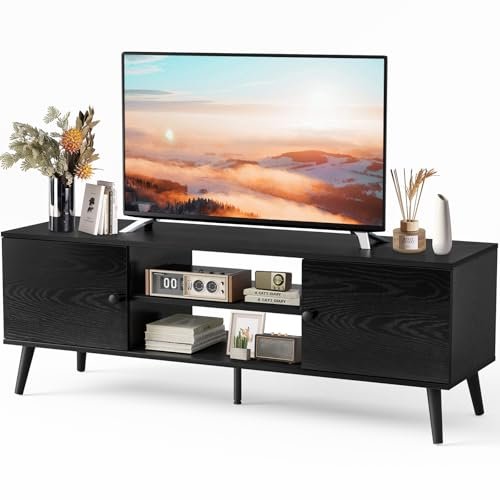
The TV stand does more than hold a television. It organizes your media gear, hides cable clutter, anchors the entertainment wall, and shapes the look of your living room. With TVs getting bigger and devices multiplying, choosing the right stand — the correct size, storage, and style — matters more than people realize. This guide covers modern TV stand designs and how to pick one that fits your TV, your space, and your setup.
Also Read



Why the Right TV Stand Matters
A TV stand supports and positions your television at a comfortable viewing height, houses your devices (streaming boxes, consoles, sound equipment), manages cables, and provides storage and display space. Get it wrong and you end up with a wobbly, undersized, or cluttered setup; get it right and your entertainment area looks clean, works smoothly, and complements the room.
Modern TV Stand Styles
- Low and long media consoles — the popular modern look: a low, wide unit that suits large TVs and gives a sleek, grounded appearance.
- Floating (wall-mounted) stands — mounted to the wall with open space beneath, for a minimalist look and easy floor cleaning.
- Storage-focused units — with cabinets, drawers, and shelves to hide and organize media gear and clutter.
- Entertainment centers — larger units with shelving around or above the TV for books, decor, and storage.
- Industrial / mixed material — wood with metal frames for a modern, characterful look.
- TV stands with mounts — include a built-in bracket so the TV attaches to the unit, saving wall-mounting.
Choose a style that matches your room and how much storage and display you need.
Getting the Size Right
Size is the most important factor. The golden rule: the TV stand should be wider than the TV — ideally several inches wider on each side — for a balanced look and safe, stable support. A stand that’s narrower than the TV looks off and can be unstable. Measure your TV’s width (and confirm the stand’s weight rating exceeds your TV’s weight). Also consider height: the TV center should sit roughly at eye level when you’re seated, so factor in the stand height plus the TV. And measure your wall space so the unit fits without crowding.
Storage & Organization
Think about what the stand needs to hold. Open shelves suit devices that need ventilation and remote-control line of sight (streaming boxes, consoles, sound bars). Closed cabinets and drawers hide clutter, games, and accessories. If you have lots of gear, prioritize a unit with a mix of open and closed storage. Built-in cable management — holes and channels to route wires — keeps the setup tidy; if the stand lacks it, plan to manage cables yourself for a clean look.
As an Amazon Associate, HomeNeeds24 earns from qualifying purchases.
TV Stand vs. Wall-Mounting
A common question: stand, wall-mount, or both? A stand is simple, requires no drilling, and provides storage — ideal for renters and those with lots of gear. Wall-mounting the TV frees up space, looks ultra-clean, and lets you place a slim console below for devices. Many modern setups combine both: TV on the wall, a low floating or standing console beneath for storage and to hide the gear. Choose based on whether you want maximum storage (stand), a minimalist look (wall-mount), or the best of both (wall-mount + console).
Materials & Durability
TV stands come in wood, engineered wood, metal, and glass. Solid or quality engineered wood is sturdy and warm; metal frames add a modern, industrial edge; glass shelves look sleek but show dust and need care. Whatever the material, check the weight capacity against your TV and gear, and look for stable construction — a TV is heavy and valuable, so stability and a sturdy build matter more than looks alone. For homes with children, anti-tip安全 anchoring is worth considering.
Styling the Entertainment Area
A TV stand is part of the room’s design, so style it. Balance the TV with decor on the unit — a plant, books, a small piece of art leaning at one end — so the area doesn’t feel like a black rectangle on a slab. Keep visible devices tidy and cables hidden. If the stand has open shelves, arrange items neatly with some negative space. The goal is an entertainment area that looks intentional and integrated, not just functional.
Frequently Asked Questions
How wide should a TV stand be?
Wider than your TV — ideally several inches wider on each side — for a balanced look and stable, safe support. Measure your TV’s width first, and check the stand’s weight rating exceeds your TV’s weight.
What height should a TV stand be?
Choose a height so the center of the TV sits roughly at eye level when you’re seated. Factor in the stand height plus the TV so viewing is comfortable.
Should I use a TV stand or wall-mount the TV?
A stand offers storage and needs no drilling; wall-mounting frees space and looks clean. Many setups combine both — TV on the wall with a low console beneath for devices and storage.
What should I look for in a TV stand?
Correct width and weight rating, the right storage mix (open for devices, closed for clutter), cable management, sturdy construction, and a style that fits your room. Anti-tip anchoring is wise with children.
Key Takeaways
- A TV stand supports the TV, organizes devices, hides cables, and anchors the entertainment area.
- Styles: low media consoles, floating units, storage-focused, entertainment centers, and mixed-material.
- Make it wider than your TV and at a height for eye-level viewing; check the weight rating.
- Match storage (open vs closed) to your gear, and prioritize cable management.
- Decide between stand, wall-mount, or both; choose sturdy materials and style the area intentionally.
The right TV stand makes your entertainment setup look clean and work smoothly. Size it correctly, match the storage to your devices, and style the area so it fits the room. For more ideas, visit our home setup guides and the full Furniture collection.